Showing posts with label mobile. Show all posts

Saturday, July 4, 2015

My JavaFX 8 essentials book is now available on Packt and Amazon

JavaFX essentials Book

I would like to take this opportunity to announce that my book "JavaFX 8 essentials" has been published yesterday on Packt publishing web site and Amazon.com as well.

This is my first post for this year 2015, it really was a very hard task and it took around 8 months of writing with all the other book stages till the publication, especially the changes that has been made during the last couple of months.

From Oracle none support for embedded JVM, the appearance of Gluon plug-in, and stop support for JavaFX scene builder, and 4 JDK updates which requires the changes in chapters more and more so the book is still up-to date to the final releases.

At the same time changes for other vendors like Raspberry Pi, Arduino, Leap Motion, Mobile (Android and iOS) software and hardware.

The book will teach:

  • Deliver complex, compelling, and high performance JavaFX 8 applications with new impressive Java SE 8 core features and enhancements.
  • Run JavaFX applications on embedded devices such as Raspberry Pi.
  • Use Scene Builder to create and define UI screens graphically and save them as JavaFX FXML-formatted files.
  • Develop amazing gesture-based applications and an interactive touch-less JavaFX application with Leap motion devices.
  • Get hands-on knowledge about mobile development and create native JavaFX applications for Apple iOS and Android platforms.
  • Use JavaFX with an Arduino board to develop desktop applications to monitor data coming from the real world or control real devices.


You can get the book from the following links:

http://www.amazon.com/JavaFX-Essentials-Mohamed-Taman/dp/1784398020/ref=sr_1_1?s=books&ie=UTF8&qid=1435742004&sr=1-1&keywords=JavaFX+Essentials

https://www.packtpub.com/web-development/javafx-essentials

Monday, June 9, 2014

Speaking activities during year 2014

Here are my speaking activities, during this year of 2014, Thanks for inviting organizations, JUGs, and international conferences.

I hope to see you all in my sessions, workshop, answers your questions and added value to you.


List of places, dates, and sessions titles:

Deliver and present the following talks in many conferences world wide, as part of sharing my experiences and evangelist the technologies especially JavaEE, JSRs, adopt-a-JSR, OpenJDK, Mobile development and others.
  1. Esprit JUG 2014 - Tunis, Tunisia. On the 7th & 8th of May

    Delivers the following sessions:
    1. What is new in Java SE, EE, ME, Embedded world, & new Strategy?
    2. Drive yourself, community with JCP & adopts to professionalism.
    3. Developing Native & Hybrid Android mobile Apps, with Netbeans 8.
    4. Yeah, TRUE real time web applications, no more hacks (a hack session).
    5. Hybrid Mobile development without IDE from CLI (Workshop).

  2. JCP executive committee F2F meeting 2014 - London, UK. On the 13th & 14th of May

    Delivers the following session:
    1. United Nations UNHCR/WFP case study (JavaEE, JavaCard, JavaSE success story).

  3. JEEConf 2014 - Kiev, Ukraine. On the 23th & 24th of May

    Talks: http://jeeconf.com/program/

    Delivers the following sessions:
    1. Yeah, TRUE real time web applications, no more hacks (a hack session).
    2. Developing Native & Hybrid Android mobile Apps, with Netbeans 8.

  4. 33rd Degree 2014 - Krakow, Poland. On the 9th to 11th of June.

    Talks: http://2014.33degree.org/speaker/show/41

    Delivers the following sessions:
    1. Architecting Hybrid mobile apps with PhoneGap.
    2. JavaSE NIO.2 API features, a walkthrough (The essential Stuff).

  5. JavaOne 2014 - San Francisco, California, USA. On the 28 Sep to 2 of October 2014.

    Delivers the following sessions:
    1. United Nations UNHCR/WFP case study (JavaEE, JavaCard, JavaSE success story).

  6. JMaghreb 3.0 2014 - Casablanca, Morocco. On the 7th & 8th of November

    Delivers the following sessions:
    1. Architecting Hybrid mobile apps with PhoneGap.
    2. Top 10 Key Performance Techniques for Hybrid mobile Apps.

Sunday, June 8, 2014

JEEConf 2014, Kiev, Ukraine trip report


Very busy May.

This May 2014 was a very busy month for me, I was so busy at work but thankfully I have finished all my heavy-duty tasks and left other managed tasks to my team to finish it till my back from my international trips.

My Trips

In last May 2014, first I went to Tunis, Tunisia, speaking at Esprit JUG Day 2014 on 7th and 8th of May, delivering the following 4 sessions:
1- What is new in Java SE, EE, ME, Embedded world, & new Strategy?
2- Drive yourself, community with JCP & adopts to professionalism.
3- Developing Native & Hybrid Android mobile Apps, with Netbeans 7.4+.
4- Yeah, TRUE real time web applications, no more hacks (a hack session).
5- Hybrid Mobile development without IDE from CLI (Workshop) (Cordova framework).
My JCP EC F2F meeting

After that I have traveled to London, United Kingdom, to attend my JCP executive committee F2F meeting 2014 on the 13th & 14th of May as I am a JCP EC member, and delivered the following session:

1. United Nations UNHCR/WFP case study (JavaEE, JavaCard, JavaSE success story).

Trip to Ukraine

On 23th and 24th I had the opportunity for the second time, to attend and speak at JEEConf 2014 in Kiev, Ukraine. This is my one of the favourite conferences I like to attends and share my experience there as well. As I was there in 2013. Among speakers from Ukraine there were a lot from other countries like UK, USA, Switzerland, Germany, Egypt (me), Greece, Sweden, Poland, Netherlands and Russia etc.

Problems

All my friends, colleagues, and work managers advised me to not travel to Ukraine, because of the political situation it has, my only words to reply are:
We already had this experience in Egypt since three years ago, so there is nothing to worry about ☺.
I love Ukraine, especially Kiev, because I have many friends there from attendees, speakers (Victor Polischuk), colleagues from Ukraine JUG Andrii Rodionov as I am EGJUG lead and MoroccoJUG member so we attends many JUG events together, and EBAM employees Olena Syrota.

Therefore I felt that I was in my country and not as a foreign guy.

Hanging out

After my arrival by a day before the event, I have decided to hangout alone to see the city and take some pictures. Then at the hotel reception I have found my friends I have met last year from Oracle Russia Speakers (Alexey Fyodorov, Alexander Belokrylov, and Sergey Kuksenko) and others (Gleb Smirnov from Deutsche Bank, Russia) and finally Ivan Krylov from Azul Systems Russia, then we hanged out together to have a dinner a Ukrainian local restaurant.


Also we went to Khreschatyk Midan (Square), where the revolution began, and here are some pictures


My talks

I have attended many English sessions, and delivered the following sessions as well:

1- Yeah, TRUE real time web applications, no more hacks (a hack session).


2- Developing Native & Hybrid Android mobile Apps, with Netbeans 8.


The first talk (Developing Native & Hybrid Android mobile Apps, with Netbeans 8.) went okay and I have found a lot of interesting questions, and response from people.

But for the second talk (Yeah, TRUE real time web applications, no more hacks (a hack session)) there were many attendees about 100+, and I couldn't take one photo to tweet it, so I have decided to take a panorama one as the following.


It was very interesting to them, and I heard many times that the talk was the best of the day. It was a master session and there were many very good and interesting questions (around 40+ questions) to answer (Thanks God, you helped me to answer all the question and satisfies the attendees).

Therefore at the end of the session, I got many Thanks cards about 41+ cards. It was a great feeling the all attendees had the experience of the talk, mastered the topic, and the hack code (application) get their interest. download it from here, download the zip file from File --> Download, it is netbeans based project.

I think both talks received a warm welcome from the audience, but I cannot be the judge of that, of course. I have just written down what I have heard, got (Thanks cards), and seen from their faces ☺ actions.


Event and Organizers

Thanks for event organizers you did a tremendous work. The hotel was very nice providing excellent services, breakfast, speedy Internet, and complementary shuttle service to any location you would like (I have chosen to drive me to the airport).

Its location was very near from the city centre, and most popular locations, restaurants, and metro stations. The event could be reached by just 4 stations about 13 min from the hotel.

Here are some pictures from my room and hotel:


And I had this great and tasty berry pie in my breakfast at my last day for me at Ukraine


Really the event was very well organized and managed, although the country passes by critical political situation.

I need to mention that there were even lunch for attendees as well as speakers, and many interesting activities. I am so happy to be part of the event successful story.

I had the opportunity to hang out with many speakers, friends, and EPAM employees, and I have enjoyed also the guided tour to many interesting places in Kiev for around three hours with the following speakers Peter Ledbrook, Nicolas Fränkel, Evgeny Borisov and his wife.


Talk to publish

After my return I got message from EPAM Educational head manager on my LinkedIn profile, they asked about my Websocket talk link, to mention it in EPAM magazine in article about JEEConf to be one of the most interesting talk in JEEConf 2014.

My hope

Thanks for this year invitation and looking forward to be part of JEEConf 2015 ☺.


Monday, December 9, 2013

Android: Boost up the Android emulator speed up to 400% on Intel based architecture

In my previous post How to inject Android compiled .apk package into its Device Emulator from the command line. I have demonstrated how to add your compiled .apk file to android emulator, from command line with adb command, included in ADT platform tools.

One of my friends commented:
"Are u really using the emulator.....it is very slow. Even on the fastest machines. I always use a real device."
From this comment, I have made some R&D about this problem, and especially this tools are developed by Google ;), and indeed they know about this symptom.

Also testing on real devices are very costly and time consuming process, as we have a variety of devices varies from multiple screen sizes, which are one of Android developer's worst nightmares. There are a huge number of different screen configurations of Android devices.


The great thing about using an emulator for development is that it gives you an opportunity to develop applications without having a real Android device. The default Android emulator comes together with the Android SDK and can be found in the "tools" folder.

So far so good, we have our coffee, but can we drink it? The answer comes about 5 minutes after we hit the "Launch" button. Go grab a coffee. Have breakfast. Come back. Wait another 5 minutes. Maybe even more.

In meantime, the default Android emulator is notoriously slow. So, what should we do? That is easy - start using a properly fast Android emulator.

Emulation vs. Simulation

If you are using Apple iPhone simulators, you will find that the iPhone simulator does not have the same issue as the Android Emulator.

One of the reasons for this is that it does not run a “real emulator”, because the CPU instruction used by the iPhone simulator is the same as the one used by the host (x86).

On the contrary, Android Emulator emulates a real ARM processor on top of an x86 processor. This is a lot of overhead.

At least for quick test and demonstration purposes, I do not need to emulate an ARM processor; I just need to be able to run Android and my application. The main objective before releasing an application is to find bugs and design imperfections.

Okay, it is slow. Then what can we do about it?


Let us go through steps to solve the slowness problem of Android emulator;

  1. First, let us delegate the rendering process to host GPU instead of overhead our CPU by this process, it will make it happy. Do it by checking "Use Host GPU" checkbox in AVD's edit window.

    The screen should now look better and be more responsive. That is because the CPU is happy to not dealing with the tedious work of doing rendering anymore. However, that is still not fast enough.


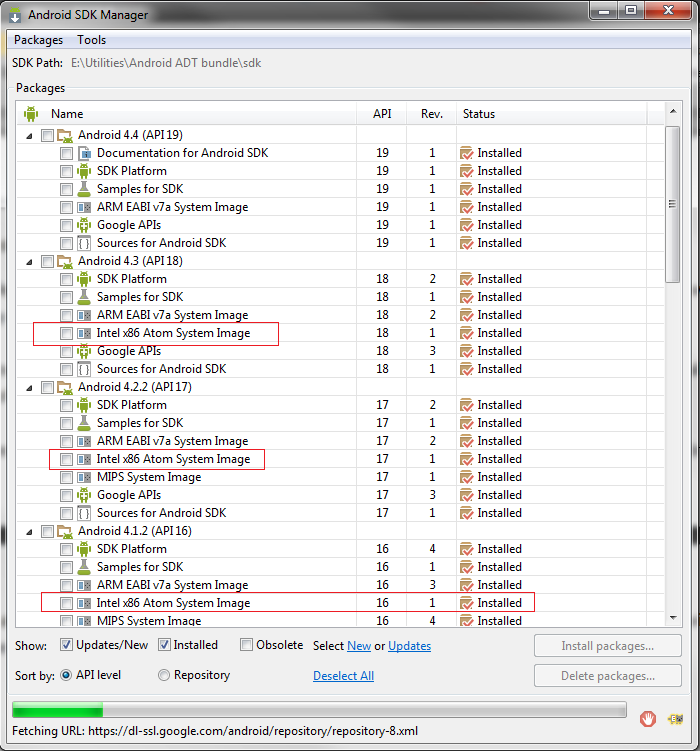
  2. Second we need to download Intel Atom (x86) system image for each Android version you need to use for testing.

  3. Third, download Intel x86 Emulator Accelerator (HAXM, for Mac and Windows only). This will enable virtual machine acceleration capabilities of the Intel CPU, from Android SDK manager --> tools. Or install it from Intel site.

  4. The SDK only copies the Intel HAXM executable on your machine, and it is up to you to install the executable.

    To install the Intel HAXM executable, search your hard drive for IntelHaxm.exe (or IntelHAXM.dmg on Mac OS X). If you left everything to default, it should be located at %Android_HOME%\sdk\extras\Intel\Hardware_Accelerated_Execution_Manager\IntelHaxm.exe.

    Intel HAXM only works in combination with one of the Intel® Atom™ processor x86 system images.


  5. In order to be able to install the Intel HAXM, you need to have Intel VT-x enabled in your BIOS, otherwise you will get an error like this during install.


    Enabling Intel VT (Virtualization Technology)


    How do I enable Intel VT in your machine BIOS?
    1. Boot into BIOS.
    2. Select "Config".
    3. Select "CPU".
    4. Press enter at "Intel Virtualization Technology".
    5. Select "Disable".
    6. Press F10 and select Yes.
    7. Boot into Windows then shutdown the system.
    8. Boot into BIOS again.
    9. Select "Enable" - Intel Virtualization Technology.
    10. Press F10 and select Yes.

  6. After installation goes successful, edit your AVD and chose Intel® Atom (x86).

  7. Finally Hit okay, then lunch your cake and definitely enjoy the speed.
VIP Note:
You could say that this level of speed should be sufficient. That may be true, but an issue with the Intel x86 images is that you do not get Google Apps, they only come with ARM images. This is important if you are testing an app that uses GMaps, or Google Play Services.

Thursday, December 5, 2013

Android: How to inject Android compiled .apk package into its Device Emulator from the command line.

I am developing multi-platform (iOS, Android, Windows, and Blackberry) hybrid mobile application for fuel stations finder, I am developing on Adobe Dreamweaver CC, and using Cordova, and PhoneGap tools as well for compilation and final apk, ipa, exe binaries.

I am using Cordova for compiling the mobile application on both windows and Mac. Moreover, I want to test my compiled (.apk) application on Android ADT AVD emulator directly instead of opening ADT eclipse, then run emulator from inside.

Note: my unzipped ADT package on the following path on my machine "E:\Utilities\Android ADT bundle", it may differ on your machine.

If you face a slow Android emulator, please refer to this post "Boost up the Android emulator speed up to 400% on Intel based architecture".

The following are the steps to inject .apk file into the emulator directly to test it:

  1. Go to "E:\Utilities\Android ADT bundle\sdk", and run SDK Manager.exe, after it opens, choose Tools then manage AVDs.

  2. On AVD manager click on your android platform, then click start from right panel.

  3. Based on your machine speed, you should see the emulator up starting Android platform.

  4. After a while, the platform should be started and ready for usage.

  5. Click on application menu as illustrated in point 4 image, then app menu should open.

  6. Under your ADT/SDK folder point to platform-tools folder.

  7. Create new folder called apps, and copy your appName.apk (in my case Banzenty.apk) into that folder.

    Note: Apps folder creation is an optional step, you can past it into the directory directly, but it is for manageability if you have many apps to test.

  8. Open your command line tool cmd on windows, terminal on Mac, and go to platform-tools.

  9. With emulator running, run the following command to check that we have the correct device:

    if everything is okay you should see the following output

    List of devices attached
    emulator-5554 device


    Otherwise nothing appears just

    List of devices attached


  10. After we checked that we have the following emulator device attached run the following command to inject the app to platform.

    If app successfully installed then output will be on console as the following:

    212 KB/s (8756736 bytes in 40.265s)
    pkg: /data/local/tmp/Banzenty.apk
    Success

  11. And into emulator platform you should find your application installed

  12. Click on the application and test it:

Happy testing :) Enjoyed it share it.